
Bingo Diary
PLAYDOGBoard
4.765.00 Reviews
- Version
- 1.1.20
- Installs
- 10.00K
- Age Rating
- Mature 17+
Screenshots





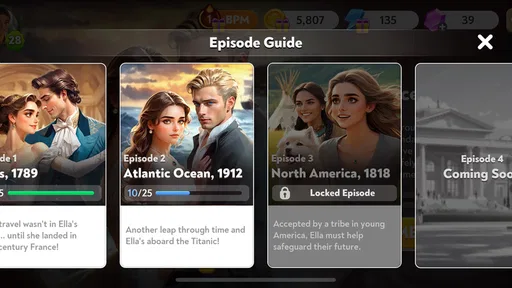


Our Review of Bingo Diary
 Analysis by Appyee
Have you ever found yourself in the mood for a little bingo action but didn't feel like heading out to the bingo hall? Enter Bingo Diary, an app that brings all the excitement of bingo right to your fingertips. I recently spent some time diving deep into this game, and let me tell you, it’s packed with more thrills than you might expect from a mobile bingo game.
First Impressions
From the moment I launched Bingo Diary, I was greeted with a vibrant and colorful interface that felt inviting and fun. The developers did a great job making sure that everything from the graphics to the sound effects gives off that classic bingo hall vibe. You know, the kind that makes you feel like you could be sitting next to someone’s grandma while she fiercely guards her bingo cards.
Getting started is a breeze. The app offers a quick tutorial for newcomers that’s not only helpful but also quite engaging. This means even if you’re a newbie to the world of bingo, you won’t feel left out or overwhelmed. The intuitive design makes navigation a cinch, which I appreciated since I prefer to dive straight into the action without a lot of fuss.
Gameplay and Features
Once you’re in, the gameplay of Bingo Diary is as straightforward as you’d hope. You can play multiple bingo cards at once, and there’s a handy auto-daub feature for those of us who like to multitask. But the real fun comes in the form of the various game modes and events that keep things fresh.
The app frequently hosts special events and challenges, which are a great way to keep players engaged. I found myself eagerly waiting for the next event to drop, as they often come with unique rewards and themes. The competitive element is enhanced with leaderboards, so if you’re the kind of player who thrives on a little friendly competition, you’ll find plenty to love here.
One of the standout features is the social aspect. You can join clubs, chat with other players, and even send and receive gifts. It adds a layer of community that’s often missing from mobile games, making it feel like more than just a solitary experience.
In-App Purchases and Currency
Like most free-to-play games, Bingo Diary offers in-app purchases. You can buy coins and power-ups to enhance your gameplay. While you’re definitely not required to spend real money to enjoy the game, it does offer a faster track to unlocking more features and cards.
I appreciated that the app doesn’t shove these purchases in your face. The balance between earning in-game currency through regular play and the option to purchase extras felt fair. You can enjoy hours of bingo without feeling like you’re hitting a paywall.
A Few Thoughts on Performance
Performance-wise, the app runs smoothly. I didn’t experience any crashes or lag, even during the more intense sessions where multiple features were in play. This is a big plus because nothing ruins a good bingo streak like unexpected technical issues!
The developers seem to be active with updates, continually adding new content and fixing any minor bugs that pop up. It’s always reassuring to see that kind of commitment from an app’s team.
Final Verdict
In the end, Bingo Diary is a delightful way to get your bingo fix without leaving the comfort of your couch. It’s packed with features that cater to both casual players and bingo enthusiasts looking for a challenge. Whether you’re in it for the social experience, the thrill of competition, or just some good old-fashioned bingo fun, this app has something for everyone.
If you’re ready to give it a shot, you can find Bingo Diary available for download on both Android and iOS platforms. Just be prepared—you might find yourself shouting "Bingo!" more often than you’d expect.
Verdict
Strengths of Bingo Diary
- Engaging gameplay with varied bingo rooms.
- Daily bonuses keep the game exciting.
- User-friendly interface and navigation.
- Vivid graphics enhance the experience.
- Frequent updates with new features.
Limitations of Bingo Diary
- Requires internet for most features.
- In-app purchases can be expensive.
- Ads may interrupt gameplay sessions.
- Limited offline play options.
- Some users report occasional crashes.
Similar Picks in This Category
View All
Ludo King®
Gametion4.1

Ludo
Yarsa Games4.6

Tile Master® - Matching Game
Higgs Studio3.6

Checkers Online
CC Games4.6

Dominoes
Loop Games4.7

Chess
Chess Prince4.6
Frequently Asked Questions
What is Bingo Diary and how does it work?
Bingo Diary is an engaging mobile app that combines the classic game of bingo with a unique diary feature, allowing players to track their progress and achievements. Users can participate in various bingo games, earn rewards, and unlock new levels while recording their gaming experiences in a personalized diary.
Is Bingo Diary free to download and play?
Yes, Bingo Diary is free to download on both Android and iOS platforms. While the app offers free gameplay, there are optional in-app purchases available for users who wish to enhance their experience with additional features, power-ups, or to speed up progress.
What are the system requirements for Bingo Diary?
To ensure a smooth gaming experience, Bingo Diary requires a device running at least Android 5.0 or iOS 11.0. The app is optimized for both smartphones and tablets, but users should ensure they have adequate storage space and a stable internet connection for the best performance.
Are there any social features in Bingo Diary?
Yes, Bingo Diary includes several social features that enhance the gaming experience. Players can connect with friends, compete on leaderboards, and share their achievements on social media. The app also offers multiplayer modes, allowing users to play bingo with friends or other players around the world.
How does Bingo Diary handle user data and privacy?
Bingo Diary prioritizes user privacy and data security. The app complies with relevant data protection regulations, ensuring that personal information is encrypted and only used for enhancing the user experience. Users can review the app’s privacy policy within the settings to understand how their data is managed.
Play our best games!


